



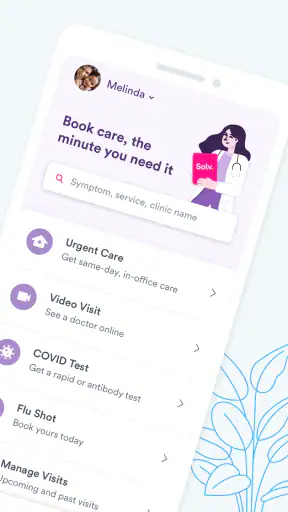
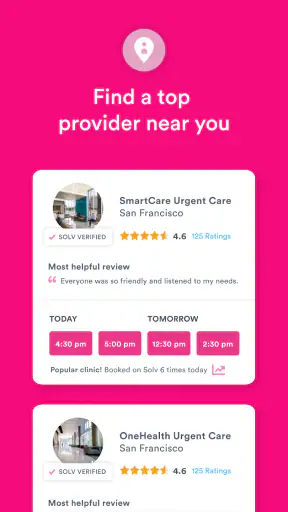
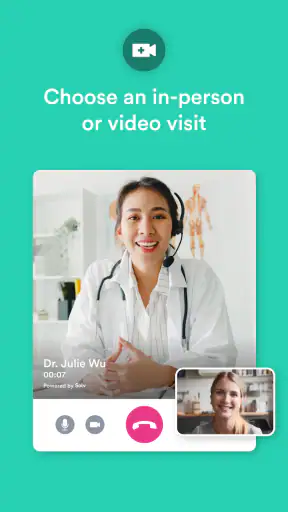
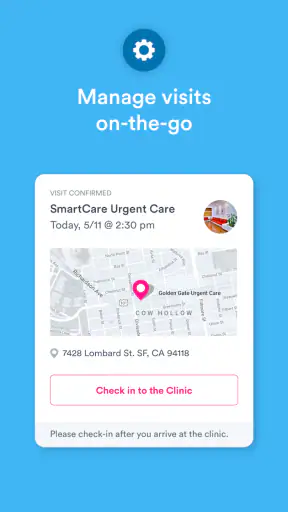
When I need medical help, the hardest part is often not deciding that I should see someone; it is finding the right kind of care without spending a long time calling clinics. Solv: Find Quality Doctor Care approaches that problem as a medical app from Solv Health, combining appointment discovery with telehealth and urgent-care access. I found it most useful as a practical starting point when the situation needed attention but did not obviously require an emergency department.
That distinction matters. This is not an app I would treat as a replacement for a primary-care relationship, a complete medical record, or emergency services. Its value is in reducing the friction between “I need help” and “I know where to go next.” The app is free, rated for Everyone, and has built a substantial audience, with more than a million installs and a 4.7 average from roughly 12 thousand ratings. Those figures suggest that the basic appointment-finding idea is working for many people, although popularity alone should not decide whether it fits your health needs.
How Solv fits into real medical decisions
A useful bridge between waiting and going in
I see Solv as a bridge between two familiar choices: searching the web for a nearby clinic and contacting a doctor’s office directly. A web search may show plenty of names but leave you to work out which location accepts your situation, whether an appointment is available, and how to begin. A phone call can answer those questions, but it also means waiting through office hours, repeating your details, and sometimes calling several places.
The app’s focus on easy telehealth appointments and urgent care makes it especially relevant for problems that need prompt attention but are not clearly life-threatening. A minor injury, a sudden illness, or a question that cannot reasonably wait for a routine appointment are the kinds of situations where a more direct route can be valuable. I would still use emergency services for severe symptoms, breathing trouble, serious injury, or anything that feels immediately dangerous. No appointment app should become a delay in an emergency.
It is also worth understanding what “finding care” means in practice. Solv can help organize the search and appointment process, but the quality of the actual visit depends on the chosen provider, the clinician, local availability, and the nature of the problem. I would read the appointment details carefully rather than assume every listing offers the same type of visit or handles every medical concern.
Who will get the most from it
I would recommend trying Solv if you often struggle to find same-day or near-term care, prefer arranging a visit digitally, or want to compare an urgent-care route with a virtual option before committing to a trip. It may also help people who are uncomfortable making medical phone calls, provided they are willing to review the information shown during the booking process instead of tapping through automatically.
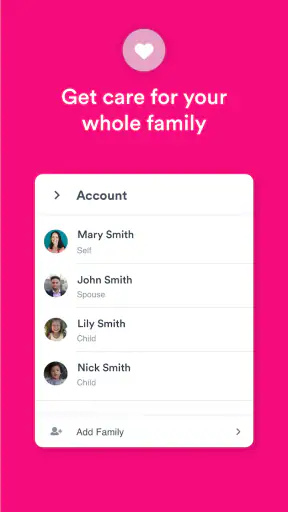
Families may find the convenience appealing when a child or another household member needs attention outside the usual routine. The important habit is to keep each person’s information separate and check whose appointment is being arranged. A fast workflow is only helpful if the correct patient, location, and visit type are selected.
I would be more cautious about relying on it if you need ongoing specialist treatment, complex coordination between several doctors, or a complete longitudinal health record. In those cases, your established clinic or health-system portal may be better because it already knows your history and care team. Solv is strongest at access and logistics, not at replacing continuity of care.
What the app’s track record tells me—and what it does not
Solv has been available since December 18, 2019, and the current version is 4.5.4. It requires Android 6.0 or later, which makes it accessible on many older Android phones. The developer is Solv Health. Its roughly 1.8 thousand written reviews can help reveal recurring user experiences, but I would treat individual reviews as clues rather than guarantees: appointment availability and clinic experience can vary by location.
The free price removes an obvious barrier to trying the service. That does not mean every medical visit arranged through it is free; the cost of care, insurance handling, and provider policies are separate questions that should be checked before confirming. I would not assume that an appointment shown in the app has the same billing terms as another appointment at a different location.
Trust begins before the appointment is confirmed
Medical scheduling involves more sensitive choices than ordering a restaurant table. A user may enter contact details, describe a reason for care, select a location, and provide information needed to arrange an appointment. My trust in an app like this therefore depends less on polished screens and more on whether it makes those choices understandable at the moment they matter.
My advice is to pause at every screen that asks for information and ask whether it is necessary for the next step. If the app presents optional communication choices, I would avoid selecting them automatically unless I genuinely want those messages. I would also review the selected provider, appointment type, date, and patient before submitting anything. These small checks are especially important when booking quickly from a phone.
I would not describe a medical app as trustworthy merely because it has a high rating. A rating reflects convenience, usability, and user expectations, but it does not by itself explain how personal information is handled or whether a particular clinic is suitable for a particular condition. The sensible approach is to combine the app’s convenience with careful reading and independent judgment.
Permissions, account choices, and visible control
When installing or updating Solv, I would inspect the permissions Android displays and approve only what makes sense for the task I want to perform. Permission prompts can change with operating-system versions, so I would not rely on a generic assumption about what the app requests. If a permission is not clearly needed for finding or managing care, I would consider denying it and checking whether the core workflow still works.
The same principle applies to account controls. I would look for settings related to notifications, saved details, communication preferences, and account access. If I only need to arrange one visit, I would avoid leaving unnecessary notifications enabled afterward. A reminder about an appointment can be useful; a constant stream of messages is not automatically useful just because it is available.
There is a practical trade-off here. Entering information once can make booking faster, but stored information also deserves attention. I would use a strong, unique password if the app requires an account, avoid sharing access to my phone while signed in, and sign out on a shared device. If the app offers ways to review or change account information, I would use them rather than creating duplicate accounts when something changes.
The safest workflow is not the fastest possible workflow; it is the fastest workflow that still leaves me in control of the patient, provider, visit type, and communication choices.
Data-sensitive moments during a medical search
The most sensitive point is often the reason for care. A short description may help direct a user toward an appropriate appointment, but I would keep it focused on what the provider needs to understand the request. I would avoid adding unrelated personal history, highly detailed notes, or information about another person unless the booking process clearly requires it.
I would also be careful when using the app in public. Searching for a clinic or entering a reason for care on public transport, at work, or in a waiting room can expose information through the screen or notifications. A phone’s lock-screen previews are easy to overlook, so I would review notification visibility if privacy is a concern. This is a simple user-controlled step that can matter as much as an app setting.
Before confirming, I would check whether I am arranging an in-person visit or a virtual appointment, and whether the selected provider is appropriate for the issue. Telehealth can save travel and waiting-room time, but it is not equally suitable for every symptom. A clinician may still need to examine you in person, perform testing, or direct you elsewhere. Choosing virtual care for convenience should never override the need for a physical assessment.
After booking, I would save the appointment details somewhere I can access without repeatedly reopening the app, while avoiding screenshots that expose unnecessary personal information. If a confirmation includes sensitive details, I would store it securely and delete it when it is no longer useful. These are not glamorous features, but they make a mobile medical workflow safer and less confusing.
Where Solv is more convenient than usual alternatives
Compared with calling several urgent-care centers, the app offers a more organized way to begin. I can search digitally, consider an appointment route, and avoid explaining the same basic request to multiple receptionists. For someone who dislikes phone calls or needs to look for care outside ordinary office routines, that reduction in friction is meaningful.
Compared with a general web search, Solv is more focused on turning the search into an appointment. A search engine may be useful for learning about symptoms or locating a clinic’s official website, but it can produce outdated pages, advertisements, and broad medical information that does not answer the immediate scheduling question. I would use web search as a second check, especially when I want to verify a clinic’s details independently.
Compared with a health-system portal, Solv may be more useful when I do not already have a suitable provider or when I am looking for urgent care beyond my usual network. The health-system portal is often the better choice for test results, established records, referrals, and messages to a known doctor. These tools serve different jobs, and I would not choose Solv simply because it is easier if my existing care team is the right place to start.
Small habits that make the experience better
My first tip is to search with the actual care need in mind, not just the nearest location. The closest option is not necessarily the most appropriate one, and a slightly farther provider with a suitable appointment may save time overall. I would compare the visit format and timing before deciding.
Second, I would review every confirmation immediately. Check the patient name, location, appointment time, visit format, and any preparation instructions while there is still time to correct an error. This is particularly important when booking for someone else or when several nearby locations appear similar.
Third, I would treat appointment availability as temporary. If I am arranging care for a time-sensitive problem, I would not wait too long after finding a suitable slot, but I would also avoid booking multiple appointments as placeholders unless cancellation rules are clear. Duplicate bookings can create confusion for both the patient and the provider.
Fourth, I would keep the app updated when practical, especially if an older version behaves strangely during scheduling. The current version is 4.5.4, and the Android requirement is 6.0 or later. Updating can address compatibility problems, but I would still read the permissions and settings after a major update rather than assuming my previous choices remain unchanged.
Finally, I would keep a backup plan. If the app does not show a suitable appointment, I would contact a local clinic directly, use my regular provider’s system, or seek an appropriate urgent-care alternative. Digital convenience should expand my options, not leave me without a next step when the app cannot solve the problem.
Situations where I would skip it
I would skip Solv as the primary route for an emergency, a rapidly worsening condition, or a problem where immediate examination is clearly necessary. I would also hesitate to use it when my insurance, referral requirements, or specialist relationship make direct contact with a particular provider more reliable. In those cases, the extra step through a general appointment platform may add delay rather than remove it.
I would also avoid treating it as a diagnostic authority. Finding an appointment is not the same as determining what is wrong. If I am uncertain whether my symptoms are urgent, I would seek professional medical guidance rather than relying on a search result or the availability of a convenient slot.
People who strongly prefer a single long-term doctor may find a dedicated practice portal more satisfying. Solv can help locate care, but continuity, records, treatment plans, and follow-up often work best through the provider already responsible for the patient’s care.
My cautious verdict after weighing convenience and control
Solv: Find Quality Doctor Care is a sensible medical-access tool when the main problem is arranging timely care, especially urgent care or telehealth, rather than managing an established treatment history. I like its practical purpose and the way it can reduce the usual back-and-forth involved in finding an appointment. The free app, Everyone age rating, broad availability, and strong 4.7 average make it easy to consider, but those points should support—not replace—careful choices.
My recommendation is to use it as a front door, not as the whole healthcare system. Confirm the provider and visit type, limit information to what is needed, review permissions and notifications, and keep your regular clinic or emergency options available. With those habits, Solv can be a convenient way to move from uncertainty to an appropriate appointment. Without them, the speed of digital booking can encourage people to overlook privacy choices, billing details, or the difference between convenient care and necessary care.
For someone who needs a straightforward way to look for medical appointments and urgent-care options, I would give it a try. For complex, ongoing, or emergency needs, I would choose the more direct and specialized route. That balance is where the app makes the most sense: useful for access, valuable for reducing friction, and best used with the same caution I would bring to any service handling personal health decisions.


